
TM SIM PUK Code: Where to Find It & How to Unlock Your Phone
You just turned on your phone. You are ready to text your friends, play a game, or scroll through TikTok. But wait. Instead of your normal home screen, you see a scary message staring back at you.
It says “SIM blocked” or “Enter PUK.”
Panic instantly sets in. You try guessing a password. Nothing happens. You try again. Still blocked. What on earth is a TM PUK code? And more importantly, how do you fix this mess right now without losing your number?
Take a deep breath. We have all been there. It is super frustrating. But the good news is that fixing this is actually pretty easy once you know where to look. If you permanently blocked your PIN and need to prove your ownership to retrieve the unlock code, the details from your original TM SIM registration will be required by the network.
Today, we are going to talk about everything you need to know about your TM SIM card and that annoying little code. We will figure out why your phone is locked. We will show you exactly how to find your code. And we will get your phone working again. Let’s get into it!
What Exactly Is a TM PUK Code?
Let’s start with the basics. What do those letters even mean?
PUK stands for “Personal Unblocking Key.”
Think of your SIM card like a digital house. Your SIM PIN is the normal key you use to open the front door. But if you try the wrong key too many times, the lock jams. The door refuses to open. That is when you need the master key. The PUK code is that master key.
Every single TM SIM card in the world has its own unique master key. It is an 8-digit number created by the network (which is Globe, since Globe powers TM). It is hardcoded to your specific SIM. You cannot change it. You cannot pick your own numbers. It is a permanent security feature designed to protect your mobile number from thieves.
If your phone still says “No Service” after you successfully enter the PUK code, you might just be experiencing a regular TM signal problem today rather than a blocked chip.
Why Did Your TM SIM Get Blocked in the First Place?
Phones do not just ask for a master key out of nowhere. Something triggered this lock.
Usually, it happens because of a simple mistake. Your SIM card has a PIN lock feature. If someone types the wrong SIM PIN three times in a row, the network immediately locks the SIM card.
Why? Because the phone thinks someone stole your SIM and is trying to guess your password. It locks down to protect your data, your load balance, and your linked accounts like GCash.
Here are a few common ways this accidental lockdown happens:
- Kids playing with your phone: You let your little brother play a game, and he accidentally restarts the phone, smashing random numbers on the lock screen.
- Pocket dials: Your phone was bouncing around in your pocket or bag. The screen woke up, and your leg accidentally typed the wrong PIN three times.
- Forgetting your own password: You actually turned the SIM PIN feature on on purpose. But then you totally forgot what numbers you used. You guessed three times, and boom! Locked out.
Whatever the reason, the result is the same. The phone is locked. Now you need the TM PUK code to rescue it. Sometimes an error when trying to dial network codes from your dialer is mistaken for a locked SIM, so checking how to fix a TM invalid MMI code might solve your issue first.
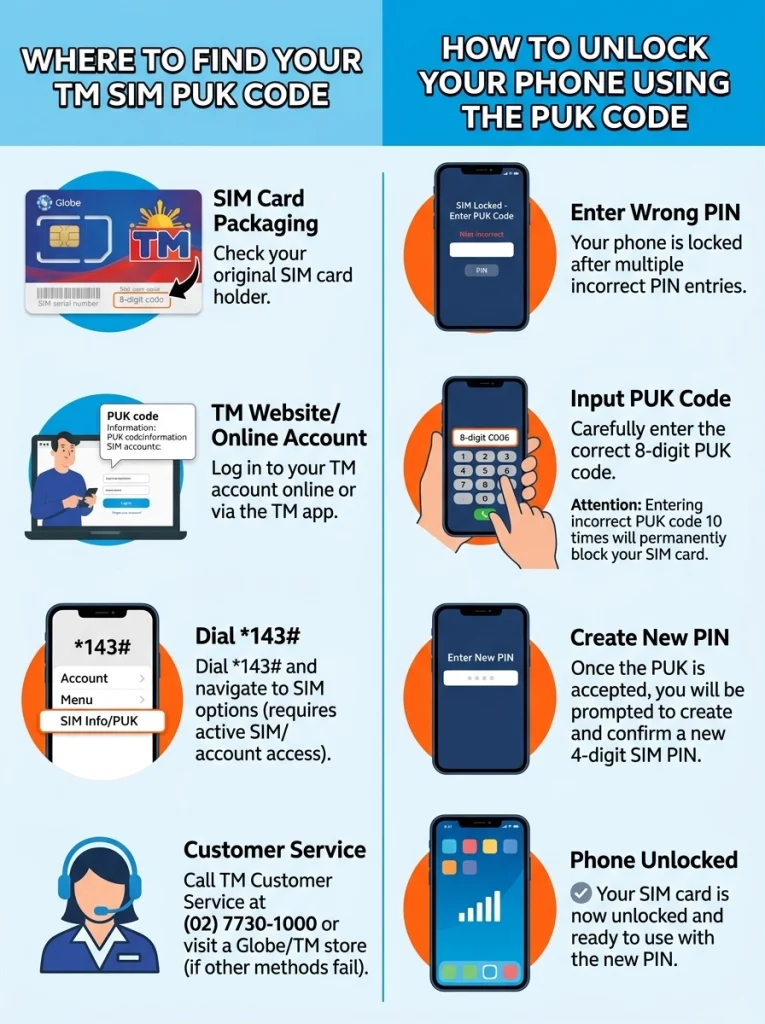
How to Find Your TM PUK Code (4 Easy Methods)
Okay, this is the part you really care about. How do you actually get this 8-digit number? You cannot just guess it. Do not even try! If you guess wrong too many times, your SIM is gone forever.
Instead, use one of these four proven methods to find your real code.
Method 1: Check the Big Plastic Card (The SIM tray)
This is the fastest and easiest way to fix your phone.
Do you remember when you first bought your TM SIM card? It came attached to a big piece of plastic, kind of like a credit card. You popped the tiny SIM out of the middle and put it in your phone. That big piece of plastic is called the SIM bed.
If you are a person who saves things, you are in luck. Go dig through your drawers. Check your wallet. Look inside the box your phone came in.
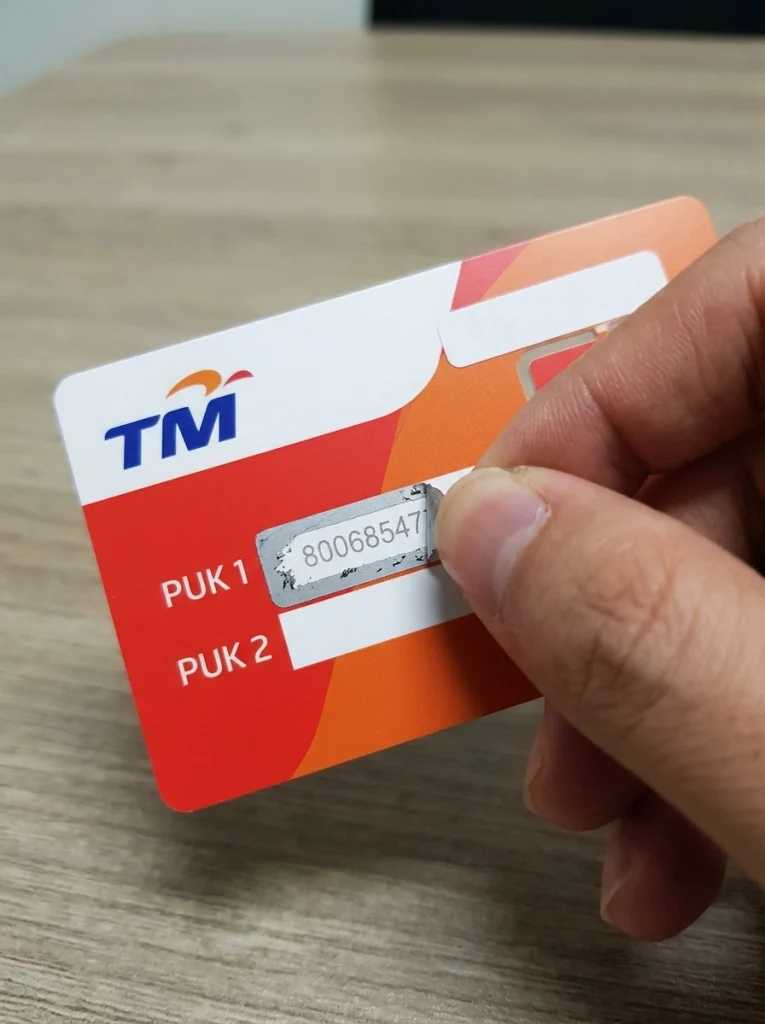
If you find that plastic SIM bed, flip it over to the back.
- You will see your mobile number.
- You will see your original SIM PIN (usually 1234).
- Right below that, you will see a scratch-off area or a printed section that clearly says “PUK.”
Those 8 digits are your master key. Type them into your phone, and you are good to go!
Method 2: Use the GlobeOne App (Highly Recommended)
What if you threw that plastic card in the trash two years ago? Don’t worry. Most people do.
Since TM is owned by Globe Telecom, you can use the super helpful GlobeOne app to find your code. But there is a catch. You must have already linked your TM number to the app before your phone got blocked.
If your number is already registered in the app, grab a friend’s phone or a tablet. Here is what you do:
- Open the GlobeOne app on the other device.
- Log in to your account using your email or social media (since your phone can’t receive an OTP text right now).
- Go to your profile or account settings.
- Look for the section that says “Account Details” or “SIM Settings.”
- There is usually a button that says “View PUK Code.” Tap it.
- The app will display your 8-digit unblocking key right on the screen.
This method is a lifesaver. It takes less than two minutes!
Method 3: Chat with TM Customer Service on Facebook
Maybe you don’t have the plastic card. And maybe you never downloaded the GlobeOne app. What now?
You need to ask the network for help. Since you cannot make a phone call with a blocked SIM, the internet is your best friend.
Grab a computer or a friend’s phone. Connect to WiFi.
- Open Facebook Messenger.
- Search for the official “TM Tambayan” Facebook page. Look for the blue checkmark so you know it is not a scam.
- Send them a message saying, “Help, I need my TM PUK code.”
- An automated bot or a real customer service agent will reply.
They will not just give you the code instantly. That would be a huge security risk! They need to prove you are the real owner of the number.
They will ask you a bunch of security questions. They might ask for your full name, your birthday, and the exact date you last loaded your phone. They might also ask how much regular load you currently have. If you answer the questions correctly, they will happily give you your 8-digit master key.
Method 4: Go to a Physical Globe Store
If all else fails, you have to do things the old-fashioned way. You need to leave the house.
Go to the nearest mall and look for a Globe Telecom branch. Bring your blocked phone, your blocked SIM card, and a valid government ID (like a passport, driver’s license, or national ID).
Walk up to the customer service desk. Tell them you accidentally blocked your TM SIM and you desperately need the PUK.
The staff is usually super friendly. They will check your ID to make sure it matches the name registered to the SIM card. (Remember that SIM registration law we all had to follow? This is why it matters! Once they verify your identity, they will look up your number in their computer system and hand you the code.
When searching for default unblocking digits online, many frustrated users wonder is Globe and TM the same since they often share similar PUK recovery steps through the GlobeOne portal.
Step-by-Step: How to Enter the Code into Your Phone
Awesome. You finally have your 8-digit TM PUK code. Now you just need to type it in. But you have to be careful. Do not rush this part.
Here is exactly how to do it safely.
- Turn on your phone screen. The scary “Enter PUK” message should be waiting for you.
- Type the 8 digits very slowly. Check every single number before you hit the Enter or OK button.
- Hit OK.
- Create a new PIN. The phone will instantly ask you to create a brand new SIM PIN. Pick a 4-digit number that is easy to remember. Do not use 1234. Maybe use a birth year or a favorite number.
- Type the new PIN again. The phone will ask you to confirm the new PIN. Type the same 4 numbers again.
- Hit OK.
Boom. Your phone screen will unlock. Your signal bars will pop back up at the top of the screen. You will suddenly get a flood of text messages you missed while your phone was locked. You are officially back online.
Once your phone is finally unlocked and functioning again, make sure you do not lose your existing promos by learning how to extend TM load before it suddenly expires.
The Danger Zone: Why You Should Never Guess Your PUK Code
We need to talk about the worst-case scenario.
When your phone asks for the PIN, you get three tries. But when your phone asks for the PUK code, the rules change. You get exactly 10 tries.
Ten tries sounds like a lot, right? It is not. People panic. They try 12345678. They try on their birthday. They try 00000000.
Do not do this.
If you enter the wrong PUK code 10 times, your SIM card permanently self-destructs. Game over.
It becomes completely dead. It will say “SIM rejected” or “SIM permanently blocked. ” You can never unblock it. You cannot fix it with the GlobeOne app. The customer service agents on Facebook cannot fix it. The SIM card is literally useless plastic at that point.
If this happens, you lose access to your GCash. You get locked out of your banking apps that send OTPs to that number. It is a massive nightmare. So please, if you do not know the real 8-digit code, just stop typing. Put the phone down. Use one of the four methods above to find the real numbers. If you enter the wrong PUK code ten times and permanently disable the chip, your only remaining option is to visit a physical store for a TM SIM replacement with same number.
What to Do If Your TM SIM is Permanently Blocked
Okay, let’s pretend the worst happened. Your little cousin got hold of your phone, typed the wrong code 10 times, and now the SIM is permanently fried.
Are you completely doomed? Do you have to tell everyone you have a new number?
Not necessarily. You can actually save your old phone number. But it takes some effort. You have to request a SIM replacement.
Here is how you do it:
- Get a valid government ID.
- Find the plastic SIM bed for your dead SIM card. (If you don’t have it, bring an affidavit of loss from a notary public.
- Go to a physical Globe store.
- Tell the agent your SIM is permanently blocked and you need a “SIM replacement with the same number.”
The agent will check your ID. If you registered the SIM legally in your name, they will take a brand-new, blank TM SIM card. They will program your old number onto this new piece of plastic. You will keep your old number!
However, there is a downside. All the text messages and contacts saved directly on the old friend’s SIM card are gone forever. But at least you get to keep your GCash and your mobile number!
Right after successfully unlocking your device with the correct sequence, do a quick TM balance inquiry to ensure all your account credits are still intact.
How to Stop This From Ever Happening Again
Getting locked out of your phone is stressful. Waiting in line at a Globe store is annoying. Let’s make sure you never, ever have to deal with a TM PUK code again.
The absolute best way to prevent this is to turn off the SIM PIN lock feature entirely. Unless you have highly classified government secrets on your phone, a simple screen lock (like a face scan or a pattern) is enough security for most people.
Here is how you turn off the annoying SIM lock so it never bothers you again:
For Android phones:
- Open your phone’s Settings app.
- Scroll down and tap on Security or Biometrics and Security.
- Look for a menu called Other Security Settings or Advanced Settings.
- Tap on Set up SIM card lock.
- You will see a little switch next to “Lock SIM card.” Turn it off.
- The phone will ask for your current SIM PIN one last time to prove it is you. Type it in.
- Done. Your SIM will never lock again.
For iPhones (iOS):
- Open your Settings app.
- Scroll down and tap on Cellular or Mobile Data.
- Tap on SIM PIN.
- Toggle the green switch to the OFF position.
- Type your current PIN one last time.
- Hit Done. You are free!
The absolute safest and most reliable way to retrieve your lost eight-digit unblocking code is to directly contact TM customer service using another active phone line.
Conclusion
Dealing with a blocked phone is definitely a headache. Seeing that “Enter PUK” message can ruin your morning. But now you know exactly what to do.
Remember, do not guess the numbers! Find your old plastic SIM tray. Use the GlobeOne app if you can. Or just send a quick message to the customer service team on Facebook. Once you get those magic eight digits, your phone will be back to normal in seconds.
Take a deep breath. Follow the steps. And once you unlock it, do yourself a huge favor—go into your settings and turn that SIM PIN lock off forever! Stay connected and stay stress-free.
Frequently Asked Questions
Can I bypass the PUK code screen?
No. You absolutely cannot bypass it. There is no secret hacker trick to skip this screen. You cannot restart the phone to make it go away. You cannot download an app to remove it. It is hardcoded into the network’s security system. You must enter the exact 8-digit master key to use that SIM card again.
Is the TM PUK code the same for everyone?
No way! That would be terrible security. Every single TM and Globe SIM card has a unique 8-digit code. Your code will not work on your mom’s phone. Her code will not work on your phone. Do not search YouTube for “free TM PUK codes.” Any code you find on the internet is fake and will just waste one of your 10 precious tries.
How much does it cost to get my PUK code?
It is 100% free! Whether you use the GlobeOne app, message TM Tambayan on Facebook, or visit a Globe physical store, they will never charge you money to give you your unblocking key. If someone on Facebook asks you to send them GCash in exchange for your code, block them immediately. They are trying to scam you.
Does the PUK code ever expire or change?
No. Your master key is permanent. It lasts forever. Even if you block your phone today, fix it, and then accidentally block it again five years from now, the 8-digit code will still be the same. That is why it is a brilliant idea to write the code down on a piece of paper and hide it in your wallet or desk drawer.
My SIM is TM, but the store says Globe. Can they still help me?
Yes. TM (Touch Mobile) is just a brand owned by Globe Telecom. They use the same computer systems and customer service centers. Any Globe store or Globe customer service agent can fully access your TM account and give you your code. Do not worry about the branding on the sign outside the store.

