
TM SIM Replacement With Same Number: How to Do It Today
Have you lost your phone recently? Or maybe your TM SIM card suddenly stopped working? Losing your SIM card is very stressful. Your whole life is connected to that little chip. Your contacts, your GCash account, your social media logins, and your daily text messages are all tied to your TM number. If you lose it, it feels like you are locked out of your own life.
But do not worry too much. The good news is that you can get a TM SIM replacement with the same number. Yes, you read that right. You do not have to start over with a brand-new number and tell all your friends to save it. You can keep your old, trusted number. If you want to keep your exact same number when getting a replacement card, your identity must perfectly match the details submitted during your original TM SIM registration before the store can process your request.
In this guide, we will talk about everything you need to know. We will show you exactly how to replace your TM SIM card. We will list down the things you need to bring. We will also give you step-by-step instructions so you know exactly what to do. Whether your SIM got stolen, broken, or just got too old, this article is for you. Let us get started right now!
Why You Might Need a TM SIM Replacement
There are many reasons why someone would need a new TM SIM card. Sometimes it is an accident, and sometimes it is a choice. Here are the most common reasons why you might be looking for a TM SIM replacement with the same number today.
Lost or Stolen Phone
This is the most common reason. Sadly, phones get lost all the time. Sometimes they fall out of your pocket while you are riding a jeepney or tricycle. Other times, bad people might steal your phone. When your phone goes missing, your SIM card goes missing with it. This is a big problem because someone else might try to use your number. They could try to open your GCash or read your private texts. If this happens to you, you need to act very fast. You must ask for a TM SIM replacement with the same number so you can lock out the person who has your old SIM.
Broken or Damaged SIM Card
Did you know that SIM cards can break? It is true. A SIM card has a tiny gold chip on it. If that gold part gets scratched too much, it will stop working. Sometimes, if you always take your SIM card out and put it back in, the chip gets worn out. Also, water can destroy a SIM card. If you drop your phone in a puddle, the SIM might die. When your SIM card is damaged, your phone will say “No SIM Card” or “Insert SIM.” You will not get any signal. You cannot text or call. If your SIM card is broken, you have to get a new one.
Upgrading to a 5G SIM
Technology is moving very fast today. A few years ago, we only had 3G and 4G internet. Now, we have 5G. 5G internet is super fast. It lets you watch videos without stopping. It lets you play online games without any lag. But here is the catch. You cannot use 5G if your SIM card is very old. Old TM SIM cards are only made for 3G or 4G. If you buy a nice new 5G phone, you need a 5G SIM card to match it. So, you can ask TM to replace your old SIM with a new 5G-ready SIM. And yes, you get to keep the same number.
Blocked or Expired SIM Card
Sometimes, people forget to load their TM SIM for a very long time. If you do not put a regular load on your SIM for many months, the network might turn it off. When it is turned off, we call it an expired SIM. Other times, a SIM card might get blocked because you typed the wrong PUK code too many times. When this happens, the SIM is useless. You will need to ask the network if they can still save your number through a replacement.
After your old number is successfully moved to the new chip, perform a quick TM balance inquiry to make sure all your remaining load and active promos were moved correctly.
Important Things to Remember Before Replacing Your SIM
Replacing your TM SIM is easy, but you must remember a few important details. First, the replacement is usually free. Yes, you do not have to pay for the new SIM card itself at the Globe Store. However, you will spend money on the affidavit of loss if your phone was stolen.
Second, you will lose your saved text messages. A new SIM card is blank. It will not have your old inbox messages from your friends. Third, you might lose some contacts. If you saved your friends’ numbers on the SIM card memory, those are gone forever. But if you saved your contacts to your Google account or Apple iCloud, you can easily get them back. Just log in to your phone.
Lastly, remember about your GCash. GCash is linked to your phone number. Once you get your replacement SIM and plug it in, your GCash will work normally again because the number is the same. You just need to log in to the app and maybe take a selfie to prove it is really you.
Getting a replacement does not mean it is ready to use instantly; you still need to follow the official steps on how to activate a TM SIM card so the network recognizes your new chip.
Requirements for TM SIM Replacement with the Same Number
Before you run to the store to get your new SIM, you need to prepare some things. The people at the store will not just give you a new SIM card because you asked for it. They need proof. They need to know that you are the real owner of the number. This is for your safety. Imagine if anyone could just steal your number! To prevent that, here are the things you must bring.
For Lost or Stolen SIMs
If someone stole your phone or if you lost it, you need to prove that it is gone. You also need to prove your identity. Here is a list of what you need:
- Affidavit of Loss: This is a legal document. You get this from a lawyer or a notary public’s office. It is a paper where you swear that you lost your SIM card. It usually costs around 150 to 300 pesos to get one. Make sure the paper includes your exact TM mobile number.
- Valid ID: You need to show a government-issued ID. This proves you are who you say you are. Good examples are your passport, driver’s license, UMID, voter’s ID, or postal ID. Bring the original ID and a clear photocopy just to be safe.
- Proof of Ownership: You need to prove the SIM is really yours. If your SIM was registered under the SIM Registration Law, your ID name should match the registered name. You can also bring the original SIM card (the big plastic card where the SIM was attached when you bought it) if you still have it.
For Damaged or Defective SIMs
If you still have the SIM card, but it is broken, the rules are a bit easier. You do not need an affidavit of loss because the SIM is not lost. Here is what you need:
- The Broken SIM Card: Bring the actual physical SIM card with you. Even if it is in pieces, bring it. Hand it over to the staff so they can see it.
- Valid ID: Just like before, bring a real government ID. They will check if the name on your ID matches the name registered to the TM SIM card in their system.
- The SIM Bed: If you still keep the big plastic card that came with the SIM, bring it. It has the PUK code and serial numbers printed on it. It helps them find your account faster in their computer system.
Having your original number back means your friends can finally stop sending credits to the wrong person and start using the standard method for how to pasaload in TM again.
Step-by-Step Guide: How to Get a TM SIM Replacement
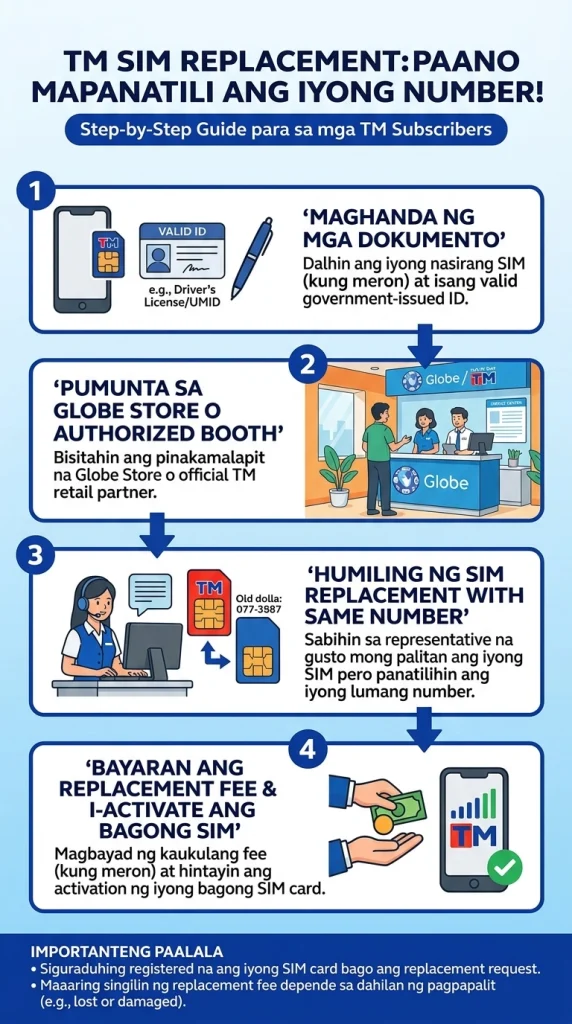
Now that you have your documents ready, it is time to get the actual replacement. There are a few different ways to do this. Since TM is a brand owned by Globe Telecom, you will be dealing with Globe to get your new SIM. Here are the exact steps you should follow today.
Visit a Globe Store
Going to a physical store is the best and fastest way to get your TM SIM replacement with the same number. You can walk out of the store with your new working SIM in your hand. Here is how you do it:
- Find the Nearest Store: Look for a Globe Store in your local mall. Almost all big malls like SM or Robinsons have one inside.
- Bring Your Documents: Double-check your bag. Make sure you have your ID, your Affidavit of Loss (if lost), or your broken SIM card.
- Talk to the Front Desk: When you walk in, a guard or a staff member will greet you. Tell them, “I want to request a TM SIM replacement with the same number.”
- Get a Number and Wait: They will give you a queue number. Wait for your number to be called. Sit down and relax.
- Explain the Problem: When it is your turn, talk to the customer service agent. Explain clearly what happened. Say if it was lost or if it just broke.
- Give Your Documents: Hand over your ID and papers. The agent will type your details into their computer. They will check if the TM SIM is registered to your name.
- Wait for the New SIM: If everything is correct, the agent will take a blank SIM card. They will program it to have your old phone number. This only takes a few minutes.
- Test the SIM: Before you go home, put the new SIM card inside your phone. Turn on the phone and check if there is a signal. Try calling a friend to make sure it works perfectly. Sometimes what looks like a broken SIM is actually just a network outage, so verify if there is a TM signal problem today before you head to the store for a replacement.
Request via the GlobeOne App
If you cannot go to a mall right away, you might be able to get help using the GlobeOne App. This app is very helpful for all TM and Globe users.
- Download the App: If you have another phone with internet, download the GlobeOne App from the Google Play Store or Apple App Store.
- Log In or Sign Up: Try to log in. This might be hard if you lost your SIM because they usually send a text code. But if you have an email linked to your account, you might get in.
- Find the Help Section: Look for the Help or Support button inside the app menu.
- Chat with an Agent: Choose the option to talk to a customer service agent. Tell them you need a TM SIM replacement for your old number.
- Follow Their Rules: The agent will ask you for details. They will ask for your full name, your birthday, and your ID. They will tell you if they can send a new SIM to your house or if you really have to go to a store.
Contact TM Customer Service
If you have a landline or a different TM number, you can call them directly to report the problem.
- Dial the Hotline: If you are using another TM or Globe phone, dial 808. If you are using a landline, you can call (02) 7730-1500.
- Speak to a Real Person: Follow the voice machine until you can talk to a real, live agent.
- Report the Lost SIM: This is very important if your phone was stolen. Tell them to block your old SIM card right away so the thief cannot use your number.
Ask for Replacement Steps: Ask the agent where the nearest open store is, and ask what exact papers you need to bring to avoid mistakes.
Once you have your new SIM card installed, you will likely need to set up your internet again by manually entering the correct APN for TM to get back online.
Common Issues During TM SIM Replacement and How to Fix Them
Sometimes, things do not go perfectly smoothly. You might face some small problems while trying to get your new SIM. Here are the most common issues and how you can fix them quickly.
Missing Requirements
The most common problem is that people forget their ID or their Affidavit of Loss. The store agents are very strict. If you do not have the right papers, they will send you home.
How to Fix It: Always double-check your bag before leaving the house. Call the hotline first to confirm exactly what you need. If you do not have a government ID, ask the store if they accept a school ID or a barangay certificate.
Unregistered SIM
The government now says all SIM cards must be registered. If you never registered your old TM SIM card, the store might say they cannot replace it. Since it was not registered in your name, they cannot prove you own it.
How to Fix It: Be honest with the agent. Ask if you can prove ownership using the original SIM card or by telling them your frequent call contacts and recent load history. But honestly, it is very hard to replace an unregistered SIM.
Out of Stock SIM Cards
Sometimes, a small Globe store runs out of blank prepaid SIM cards. You will wait in line only to be told to come back tomorrow.
How to Fix It: Try to visit a big Globe store in a very big mall. They usually have a lot of stock. You can also try calling the store ahead of time to ask if they have blank TM replacement SIMs available today.
Tips for a Smooth TM SIM Replacement
We want your experience to be as easy as possible. Here are some extra tips to help you out when you go to the store.
- Go Early in the Morning: Malls get very crowded in the afternoon. If you go right when the mall opens, you will be the first in line. You can finish everything in thirty minutes.
- Keep Your SIM Bed Safe: When you buy a new SIM, never throw away the big plastic card it comes in. Keep it in a safe drawer. It is the best proof of ownership if you ever lose your phone.
- Sync Your Contacts: Stop saving phone numbers to your SIM card. Start saving them to your Google account or email. This way, even if your SIM breaks or gets lost, your contacts are safe in the cloud.
- Be Polite to the Staff: The customer service agents talk to angry people all day. If you smile and speak politely to them, they will be much happier to help you solve your problem quickly.
Conclusion
Losing your phone or dealing with a broken SIM card is no fun at all. It can make you feel disconnected from your family, friends, and even your work. But as we have learned today, getting a TM SIM replacement with the same number is totally possible.
It is actually a very simple process. You just need to know the reasons; gather your correct documents, like your valid ID and affidavit of loss; and visit your nearest Globe Store. By following the step-by-step guide we shared, you will have your trusty old TM number back in your hands in no time. Do not let a lost or broken SIM ruin your week. Just prepare your things and take action. Stay connected, keep your number, and enjoy your fast TM mobile network!
Frequently Asked Questions
Is the TM SIM replacement with the same number free?
Yes, getting the actual blank SIM card programmed with your old number is usually free at the Globe Store. But if you lost your phone, you have to pay a lawyer or notary for the Affidavit of Loss paper.
How long does it take to activate the new replacement SIM?
It is very fast! Once the store agent hands you the new SIM card, it is usually active right away. Sometimes it takes about 15 to 30 minutes for the network to fully connect. Just restart your phone.
Will my GCash account still work with the new SIM?
Yes! Because your phone number is the same, your GCash account will stay the same. Your money is safe. You just need to install the GCash app again and log in with your PIN.
Can I replace my TM SIM card at a sari-sari store?
No, you cannot. Sari-sari stores only sell brand-new SIM cards with brand-new numbers. To keep your same number, you must go to an official Globe Store so they can program a blank SIM card for you.
What if I lost my SIM card, but I never registered it?
This is a big problem. If your SIM was never registered under your name in the TM system, it is very difficult to prove you own it. The store might refuse to replace it. Always register your SIM cards!

